
Youth Information Handbook
2025/26
-
Teamo us used to show all upcoming events, festivals, matches and training.
It allows you to highlight when you child is and is not available for training or festivals in advance which allows the coaches to plan training sessions.
-
The initial hope was that Teamo would remove the need for the various WhatsApp groups and streamline the coaches workload however, in practice, we have found that the chat features within Teamo are clunky at best, this has resulted in a number of year groups keeping their WhatsApp groups in order to maintain communication with parents.
While communication is important; these disparate WhatsApp groups were not aligned to Melrose Rugby’s data protection standards.
WhatsApp communities was trialed and brought into Melrose Rugby over the 24/25 season and (from the start of the 25/26 season) is the recommended tool for all club communication to players, parents, guardians, etc…
Please note: No player under the age of 16 should be on any Melrose Rugby WhatsApp groups.
-
The Youth Committee identified a need for a Club Management System in 2022 in order to try and resolve 4 key challenge areas in the club.
Unclear Youth Membership
Unmonitored WhatsApp groups
Lack of ability to communicate consistently with all parents
Youth information storage not being GDPR compliant
An extensive analysis phase was performed in the 22/23 season looking at all Club Management tools including Teamo, PitchHero, Fanbase and Spond (among others). Following this analysis the Melrose Rugby Youth Committee recommended Teamo and it was approved by the Melrose Board.
However, due to feedback from the youth section (coaches and parents) we trialed WhatsApps Communities for club communications. We received positive feedback from this trial so from the 25/26 season; all club communications should be in a Melrose Rugby WhatsApp Community group.
Teamo & WhatsApp Communities
Regular Teamo Issues
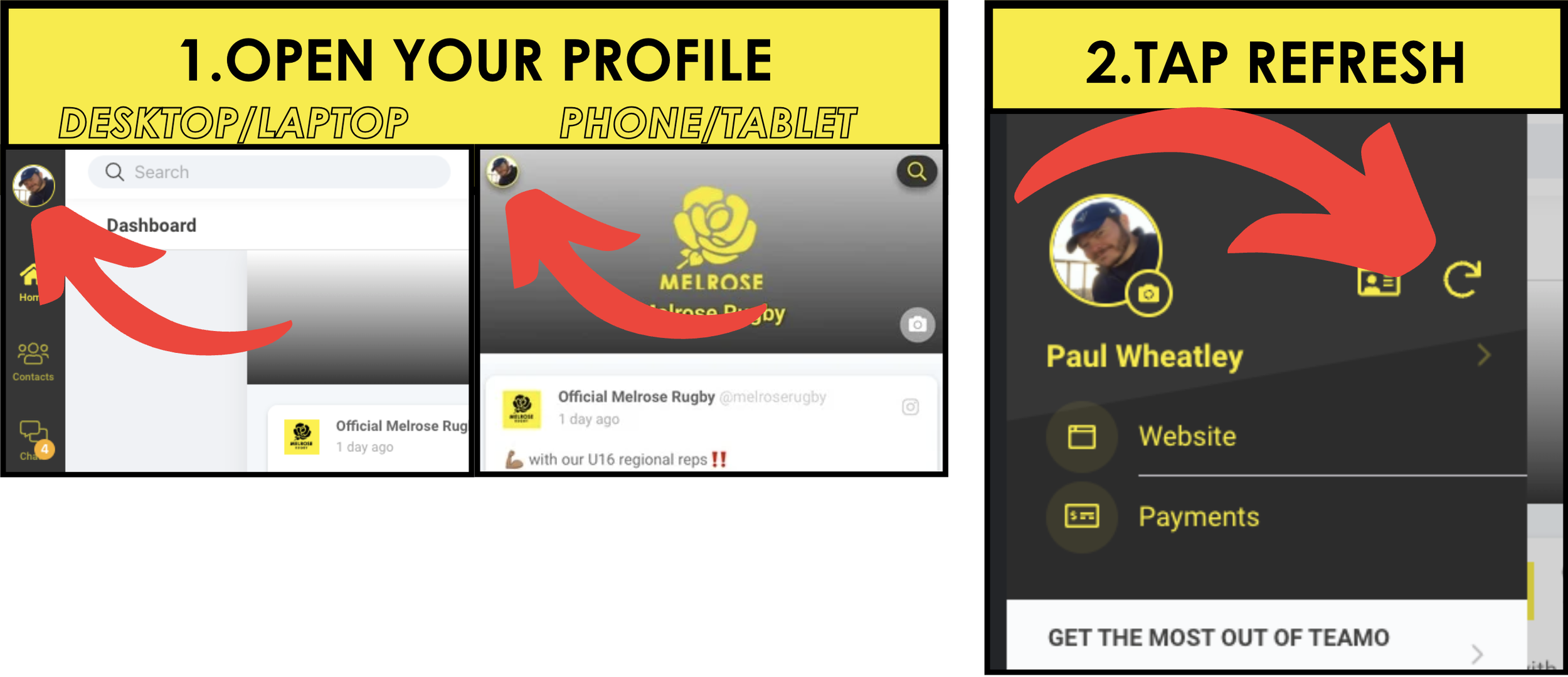
Refresh/Reset the app
When a change happens (e.g. Membership bought, team change, address change, etc...) it sometimes takes a little while for that change to be reflected on the app.
A quick was to resolve this is to ‘Refresh’ the Teamo app on your device (Note: this doesn’t mean you will need to log in again, it just forces the app to check for new information on the server).Multiple children/parents
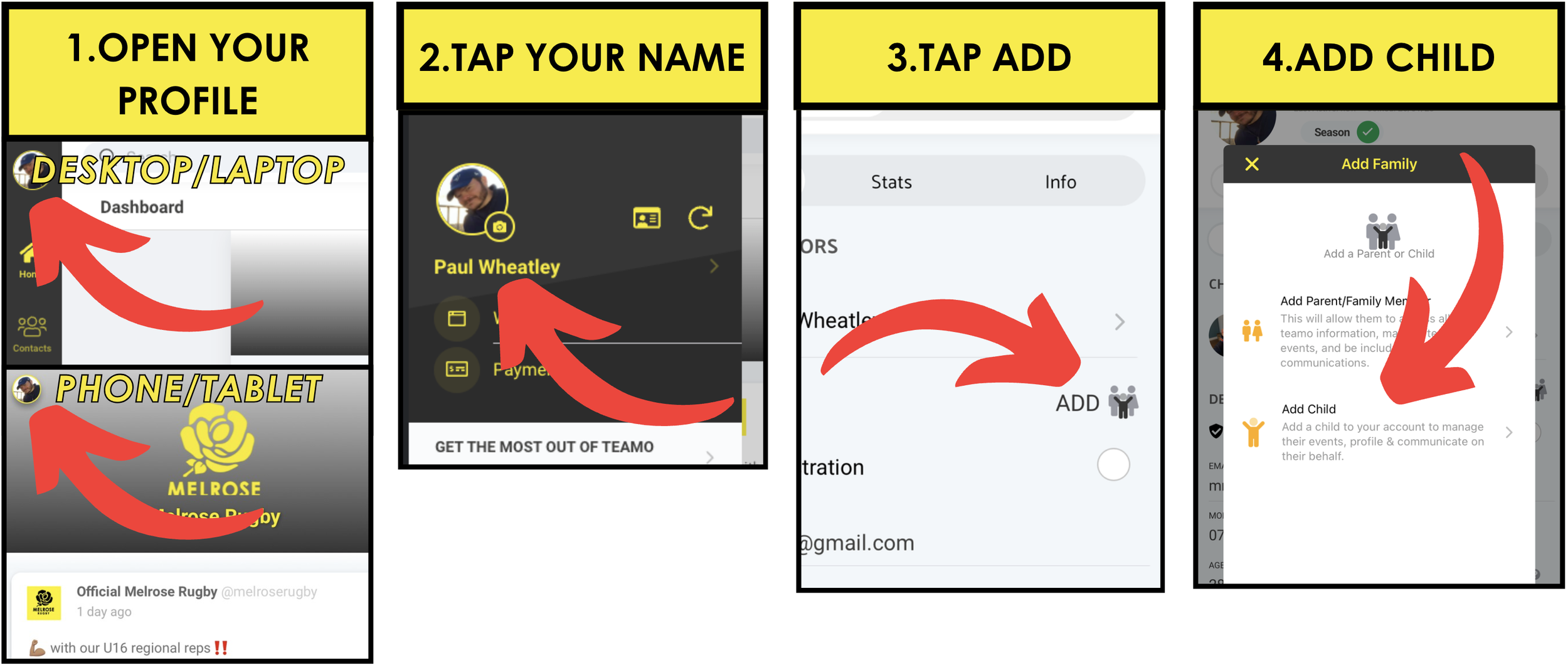
An issue we see regularly is where a parent or parents have more than 1 child playing Rugby for Melrose. Its not clear how you add a second child or a spouse to the app once you have initially signed up.
Adding Children
Adding a Spouse/guardian/adult family member
You can follow the above instructions for adding a child, but in step 4 select ‘Add parent/family member’. However we have found that this often doesn’t work as well as it should.
Another solution is to ask the other parent/guardian/family member to sign up to Teamo as you did but don’t add another instance of the child. The second adult should sign up as an adult player (don’t worry, you are not signing up to pull on a yellow and black jersey on a Saturday afternoon!). Once they are signed up; email teamo@melroserugby.org with all the details (both adults names, child name, etc...) and we can link you all up in the background.
If you do add a second instance of the child in the system; don’t worry, just email teamo@melroserugby.org and we can fix it.
Kit Sizes
As part of the signup process you may be asked to provide kit sizes for you or your child. This is a historic part of registration that has been replaced with the Youth Kit Store (See later section with details).
We are working with Teamo to remove this but for the meantime you can ignore.Note: Adding your child’s kit sizes here does not order any kit for them.
WASPS ▶︎
◀︎ QUEEN BEES